
Skip to content

Excel Functions

Excel f(x)s = Excel Functions

  • Stale values (Scratched functions) Excel User tips
  • OFFSET+MATCH Formulas - combined functions
  • Why I ran from =INDIRECT() function Formulas - combined functions
  • State Abbr with Index+Match+Validation Data Validation
  • Formula Beautifier Excel User tips
  • Excel sessions – 2013 VS 2010 Excel User tips
  • FORMULATEXT to show formulas FORMULATEXT
  • Rotate table using 1 formula ADDRESS

Category: Hour

Calculate hours between two cells
Posted on February 27, 2017 By ANmar
Calculate hours between two cells

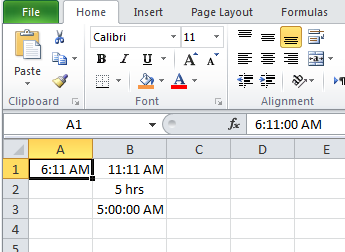
We needed that several times in the past Then I found it in an old file in my laptop, thought to share it for others to help So, when A1 has the start time, B1 has the end time Time different in one day will be from formula =IF(OR(A1=””,B1=””),””,ABS((HOUR(A1)+MINUTE(A1)/60)-(HOUR(B1)+MINUTE(B1)/60))&” hrs”)   I added to prevent…

Read More “Calculate hours between two cells” »

ABS, Basic Math, Date and Time, Hour, IF, Logical, OR, Standard functions

Recent Posts

  • Calculate above and below me
  • Stale values (Scratched functions)
  • Middle name + 1st name
  • LastSunday, LastSaturday
  • Paste Special Percentage

Archives

Categories

  • Array formula (1)
  • Formulas – combined functions (58)
  • Google Sheets (2)
  • Non-functions (36)
    • ActiveX controls (2)
    • Conditional Formatting (7)
    • Data Validation (7)
    • Excel User tips (19)
    • Format Cells (6)
    • Graphics (4)
    • Names (3)
  • Standard functions (83)
    • Basic Math (18)
    • Date and Time (16)
      • DATE (9)
      • Hour (1)
      • MONTH (7)
      • NETWORKDAYS (2)
      • TODAY (7)
      • WEEKDAY (8)
      • WEEKNUM (1)
      • YEAR (8)
    • Engineering (1)
      • CONVERT (1)
    • Information (6)
      • CELL (4)
      • ISERROR (1)
      • N (1)
    • Logical (31)
      • AND (5)
      • IF (25)
      • IFERROR (7)
      • IFNA (1)
      • IFS (1)
      • ISERROR (1)
      • OR (2)
    • Lookup and References (36)
      • ADDRESS (4)
      • CHOOSE (3)
      • COLUMN (7)
      • FORMULATEXT (1)
      • HLOOKUP (1)
      • HYPERLINK (2)
      • INDEX (5)
      • INDIRECT (6)
      • MATCH (12)
      • OFFSET (15)
      • ROW (11)
      • VLOOKUP (5)
    • Math and Trig (24)
      • ABS (1)
      • CEILING (1)
      • COUNT (1)
      • COUNTA (4)
      • INT (9)
      • LARGE (2)
      • MAX (1)
      • Min (2)
      • SMALL (3)
      • SUM (3)
      • SUMIF (1)
      • SUMIFS (2)
      • SUMPRODUCT (1)
    • Statistical (6)
      • Average (1)
      • COUNTIF (4)
      • COUNTIFS (1)
    • Texts and Strings (24)
      • CHAR (5)
      • CONCATINATE (1)
      • FIND (1)
      • LEFT (8)
      • Len (4)
      • MID (9)
      • REPT (3)
      • RIGHT (2)
      • SEARCH (9)
      • STRING (1)
      • SUBSTITUTE (2)
      • TEXT (4)
      • TRIM (2)
      • VALUE (2)
  • Uncategorized (2)
  • User-Defined f(x)s = UDF (3)
    • HyperlinkOf (1)
  • Worksheet (16)
  • XLfxs (2)

Meta

  • Log in
  • Entries feed
  • Comments feed
  • WordPress.org
  • Unix DateTime Number Basic Math
  • Cell formats 0.0\% and 0.0%;(0.0%) Format Cells
  • Formula Beautifier Excel User tips
  • Count Unique COUNTIF
  • Week number to Sunday date – Weeknum reverse DATE
  • Dynamic selection list ActiveX controls
  • Insert Blank rows into table using functions CHAR
  • Progress bar in pure functions CHAR

Copyright © 2026 Excel Functions.

Powered by PressBook News Dark theme