

Skip to content

Excel Functions

Excel f(x)s = Excel Functions

  • Validation based on another Validation COUNTA
  • Show developer tab Excel User tips
  • Week number to Month number DATE
  • Search across sheets in function ADDRESS
  • When Excel functions are not enough Excel User tips
  • Cells with additional spaces AND
  • Skills Grid Conditional Formatting
  • Compare2, a tool to compare two sheets using formulas Conditional Formatting

Category: VALUE

6174 Kaprekar’s constant

Posted on September 2, 2022 By ANmar
6174 Kaprekar’s constant

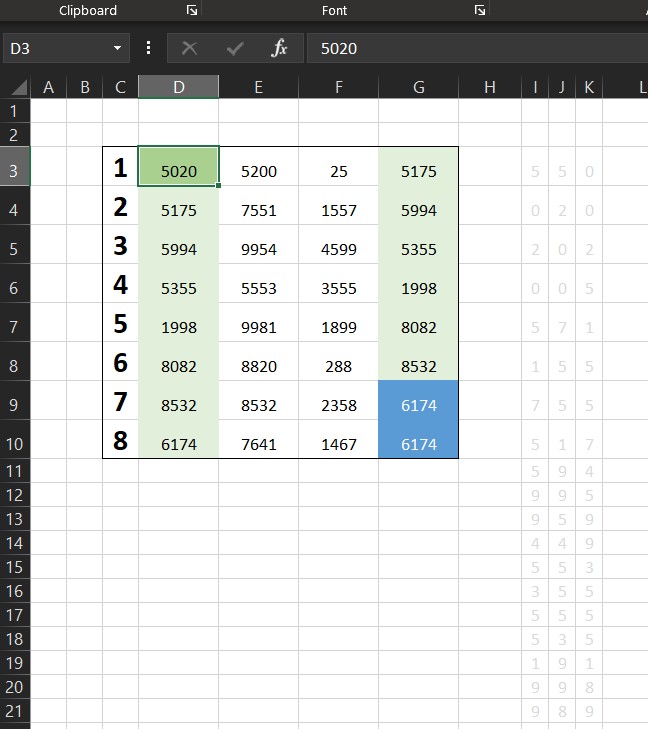
This is the spreadsheet to prove this constant. When all roads lead to Kaprekar

Just enter any 4 digits number in D3 and watch roads walk you 6174

Read More “6174 Kaprekar’s constant” »

Basic Math, Formulas - combined functions, Standard functions, TEXT, Texts and Strings, VALUE

VALUE() of LEFT()

Posted on July 7, 2022 By ANmar
VALUE() of LEFT()

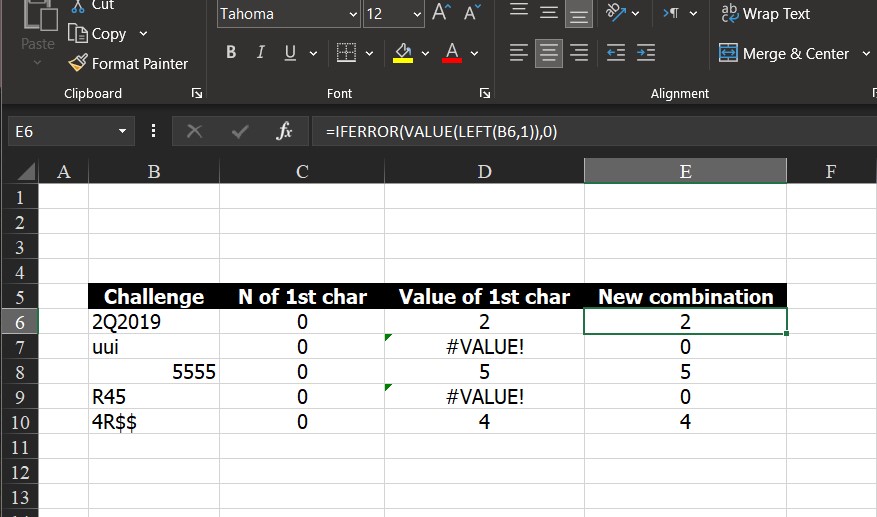
I have been in a lot of situation needing to convert a number came out from a string into actual numbers. Sometimes N() worked, sometimes not, others VALUE() worked, but I did not see a function-does-all solution.
Read More “VALUE() of LEFT()” »

Formulas - combined functions, IF, IFERROR, Information, LEFT, Logical, N, Standard functions, Texts and Strings, VALUE

Recent Posts

  • Stale values (Scratched functions)
  • Middle name + 1st name
  • LastSunday, LastSaturday
  • Paste Special Percentage
  • Jan8 date format

Archives

Categories

  • Array formula (1)
  • Formulas – combined functions (58)
  • Google Sheets (2)
  • Non-functions (36)
    • ActiveX controls (2)
    • Conditional Formatting (7)
    • Data Validation (7)
    • Excel User tips (19)
    • Format Cells (6)
    • Graphics (4)
    • Names (3)
  • Standard functions (82)
    • Basic Math (18)
    • Date and Time (16)
      • DATE (9)
      • Hour (1)
      • MONTH (7)
      • NETWORKDAYS (2)
      • TODAY (7)
      • WEEKDAY (8)
      • WEEKNUM (1)
      • YEAR (8)
    • Engineering (1)
      • CONVERT (1)
    • Information (6)
      • CELL (4)
      • ISERROR (1)
      • N (1)
    • Logical (30)
      • AND (5)
      • IF (24)
      • IFERROR (6)
      • IFNA (1)
      • IFS (1)
      • ISERROR (1)
      • OR (2)
    • Lookup and References (36)
      • ADDRESS (4)
      • CHOOSE (3)
      • COLUMN (7)
      • FORMULATEXT (1)
      • HLOOKUP (1)
      • HYPERLINK (2)
      • INDEX (5)
      • INDIRECT (6)
      • MATCH (12)
      • OFFSET (15)
      • ROW (11)
      • VLOOKUP (5)
    • Math and Trig (24)
      • ABS (1)
      • CEILING (1)
      • COUNT (1)
      • COUNTA (4)
      • INT (9)
      • LARGE (2)
      • MAX (1)
      • Min (2)
      • SMALL (3)
      • SUM (3)
      • SUMIF (1)
      • SUMIFS (2)
      • SUMPRODUCT (1)
    • Statistical (5)
      • COUNTIF (4)
      • COUNTIFS (1)
    • Texts and Strings (24)
      • CHAR (5)
      • CONCATINATE (1)
      • FIND (1)
      • LEFT (8)
      • Len (4)
      • MID (9)
      • REPT (3)
      • RIGHT (2)
      • SEARCH (9)
      • STRING (1)
      • SUBSTITUTE (2)
      • TEXT (4)
      • TRIM (2)
      • VALUE (2)
  • Uncategorized (2)
  • User-Defined f(x)s = UDF (3)
    • HyperlinkOf (1)
  • Worksheet (16)
  • XLfxs (2)

Meta

  • Log in
  • Entries feed
  • Comments feed
  • WordPress.org
  • Blank (isempty) VS “” (null string) Excel User tips
  • Change Calculator – calculate change in multiple bills/coins Formulas - combined functions
  • Workdays – Across months DATE
  • Walking Columns ActiveX controls
  • Excel Limits Excel User tips
  • Pixel Excel Drawing Format Cells
  • 6174 Kaprekar’s constant Basic Math
  • DayName Date and Time

Copyright © 2026 Excel Functions.

Powered by PressBook News Dark theme