


Skip to content

Excel Functions

Excel f(x)s = Excel Functions

  • Worksheet name, dynamically using formula CELL
  • Lesson learned: Do not trust Google Sheets function Google Sheets
  • GoLast to jump to last cell in a column CELL
  • Insert Blank rows into table using functions CHAR
  • Get 3rd Wednesday of month Basic Math
  • WorksheetName and WorksheetsNo UDFs Lookup and References
  • Repeated Offset Basic Math
  • Return 12 values in one number AND

Category: ABS

Calculate hours between two cells
Posted on February 27, 2017 By ANmar
Calculate hours between two cells

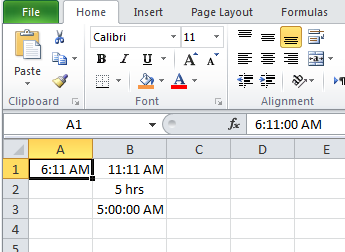
We needed that several times in the past Then I found it in an old file in my laptop, thought to share it for others to help So, when A1 has the start time, B1 has the end time Time different in one day will be from formula =IF(OR(A1=””,B1=””),””,ABS((HOUR(A1)+MINUTE(A1)/60)-(HOUR(B1)+MINUTE(B1)/60))&” hrs”)   I added to prevent…

Read More “Calculate hours between two cells” »

ABS, Basic Math, Date and Time, Hour, IF, Logical, OR, Standard functions

Recent Posts

  • Stale values (Scratched functions)
  • Middle name + 1st name
  • LastSunday, LastSaturday
  • Paste Special Percentage
  • Jan8 date format

Archives

Categories

  • Array formula (1)
  • Formulas – combined functions (58)
  • Google Sheets (2)
  • Non-functions (36)
    • ActiveX controls (2)
    • Conditional Formatting (7)
    • Data Validation (7)
    • Excel User tips (19)
    • Format Cells (6)
    • Graphics (4)
    • Names (3)
  • Standard functions (82)
    • Basic Math (18)
    • Date and Time (16)
      • DATE (9)
      • Hour (1)
      • MONTH (7)
      • NETWORKDAYS (2)
      • TODAY (7)
      • WEEKDAY (8)
      • WEEKNUM (1)
      • YEAR (8)
    • Engineering (1)
      • CONVERT (1)
    • Information (6)
      • CELL (4)
      • ISERROR (1)
      • N (1)
    • Logical (30)
      • AND (5)
      • IF (24)
      • IFERROR (6)
      • IFNA (1)
      • IFS (1)
      • ISERROR (1)
      • OR (2)
    • Lookup and References (36)
      • ADDRESS (4)
      • CHOOSE (3)
      • COLUMN (7)
      • FORMULATEXT (1)
      • HLOOKUP (1)
      • HYPERLINK (2)
      • INDEX (5)
      • INDIRECT (6)
      • MATCH (12)
      • OFFSET (15)
      • ROW (11)
      • VLOOKUP (5)
    • Math and Trig (24)
      • ABS (1)
      • CEILING (1)
      • COUNT (1)
      • COUNTA (4)
      • INT (9)
      • LARGE (2)
      • MAX (1)
      • Min (2)
      • SMALL (3)
      • SUM (3)
      • SUMIF (1)
      • SUMIFS (2)
      • SUMPRODUCT (1)
    • Statistical (5)
      • COUNTIF (4)
      • COUNTIFS (1)
    • Texts and Strings (24)
      • CHAR (5)
      • CONCATINATE (1)
      • FIND (1)
      • LEFT (8)
      • Len (4)
      • MID (9)
      • REPT (3)
      • RIGHT (2)
      • SEARCH (9)
      • STRING (1)
      • SUBSTITUTE (2)
      • TEXT (4)
      • TRIM (2)
      • VALUE (2)
  • Uncategorized (2)
  • User-Defined f(x)s = UDF (3)
    • HyperlinkOf (1)
  • Worksheet (16)
  • XLfxs (2)

Meta

  • Log in
  • Entries feed
  • Comments feed
  • WordPress.org
  • Return 12 values in one number AND
  • Comments versus Notes Excel User tips
  • Compare2, a tool to compare two sheets using formulas Conditional Formatting
  • CTRL+Y a mini macro Excel User tips
  • Shades of gray Graphics
  • When Excel functions are not enough Excel User tips
  • Multiple lines in cell using functions CHAR
  • Formula Beautifier Excel User tips

Copyright © 2025 Excel Functions.

Powered by PressBook News Dark theme