
Skip to content

Excel Functions

Excel f(x)s = Excel Functions

  • OFFSET+MATCH Formulas - combined functions
  • Sort list dynamically (functions) COLUMN
  • Lesson learned: Do not trust Google Sheets function Google Sheets
  • Middle name + 1st name Basic Math
  • Formula Beautifier Excel User tips
  • Worksheet name, dynamically using formula CELL
  • Highlight dates dynamically AND
  • VALUE() of LEFT() Formulas - combined functions

Category: STRING

MID + SEARCH to convert cell to rows
Posted on January 23, 2012 By ANmar No Comments on MID + SEARCH to convert cell to rows
MID + SEARCH to convert cell to rows

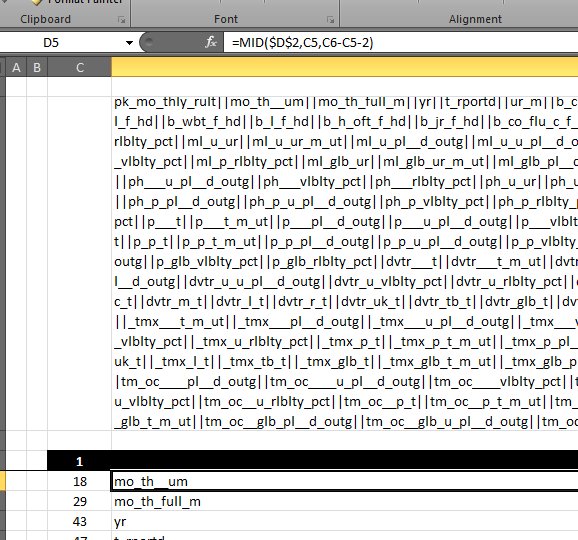
I have been there and done that more than once before This time I had a really large cell, more than 3k characters need to be converted into rows, and here is how you can do it. This one uses MID with SEARCH to do that Use one column to get the character number of…

Read More “MID + SEARCH to convert cell to rows” »

MID, SEARCH, Standard functions, STRING, Texts and Strings

Recent Posts

  • Calculate above and below me
  • Stale values (Scratched functions)
  • Middle name + 1st name
  • LastSunday, LastSaturday
  • Paste Special Percentage

Archives

Categories

  • Array formula (1)
  • Formulas – combined functions (58)
  • Google Sheets (2)
  • Non-functions (36)
    • ActiveX controls (2)
    • Conditional Formatting (7)
    • Data Validation (7)
    • Excel User tips (19)
    • Format Cells (6)
    • Graphics (4)
    • Names (3)
  • Standard functions (83)
    • Basic Math (18)
    • Date and Time (16)
      • DATE (9)
      • Hour (1)
      • MONTH (7)
      • NETWORKDAYS (2)
      • TODAY (7)
      • WEEKDAY (8)
      • WEEKNUM (1)
      • YEAR (8)
    • Engineering (1)
      • CONVERT (1)
    • Information (6)
      • CELL (4)
      • ISERROR (1)
      • N (1)
    • Logical (31)
      • AND (5)
      • IF (25)
      • IFERROR (7)
      • IFNA (1)
      • IFS (1)
      • ISERROR (1)
      • OR (2)
    • Lookup and References (36)
      • ADDRESS (4)
      • CHOOSE (3)
      • COLUMN (7)
      • FORMULATEXT (1)
      • HLOOKUP (1)
      • HYPERLINK (2)
      • INDEX (5)
      • INDIRECT (6)
      • MATCH (12)
      • OFFSET (15)
      • ROW (11)
      • VLOOKUP (5)
    • Math and Trig (24)
      • ABS (1)
      • CEILING (1)
      • COUNT (1)
      • COUNTA (4)
      • INT (9)
      • LARGE (2)
      • MAX (1)
      • Min (2)
      • SMALL (3)
      • SUM (3)
      • SUMIF (1)
      • SUMIFS (2)
      • SUMPRODUCT (1)
    • Statistical (6)
      • Average (1)
      • COUNTIF (4)
      • COUNTIFS (1)
    • Texts and Strings (24)
      • CHAR (5)
      • CONCATINATE (1)
      • FIND (1)
      • LEFT (8)
      • Len (4)
      • MID (9)
      • REPT (3)
      • RIGHT (2)
      • SEARCH (9)
      • STRING (1)
      • SUBSTITUTE (2)
      • TEXT (4)
      • TRIM (2)
      • VALUE (2)
  • Uncategorized (2)
  • User-Defined f(x)s = UDF (3)
    • HyperlinkOf (1)
  • Worksheet (16)
  • XLfxs (2)

Meta

  • Log in
  • Entries feed
  • Comments feed
  • WordPress.org
  • Extract current (Active) workbook name CELL
  • Tally chart in functions Formulas - combined functions
  • Why I ran from =INDIRECT() function Formulas - combined functions
  • Cells with additional spaces AND
  • State Abbr with Index+Match+Validation Data Validation
  • Worksheet name, dynamically using formula CELL
  • Hello world! Uncategorized
  • Blank (isempty) VS “” (null string) Excel User tips

Copyright © 2026 Excel Functions.

Powered by PressBook News Dark theme