

Skip to content

Excel Functions

Excel f(x)s = Excel Functions

  • Dynamic selection list ActiveX controls
  • Why I ran from =INDIRECT() function Formulas - combined functions
  • Compare2, a tool to compare two sheets using formulas Conditional Formatting
  • When Excel functions are not enough Excel User tips
  • The Excel “&” bug Excel User tips
  • Paste Special Percentage Excel User tips
  • CHOOSE – tree of decisions CHOOSE
  • Custom fiscal year calendar (CFlex) Basic Math

Category: CEILING

Limited Ceiling

Posted on March 13, 2018 By ANmar
Limited Ceiling

The function CEILING (CEILING.Math as of Excel 2016) is a very good powerful function.

It allows you to round  number to any value up

Unlike ROUND, ROUNDUP and ROUNDDOWN, that are limited to number of decimal places.

CEILING can round to any number, decimal or not.

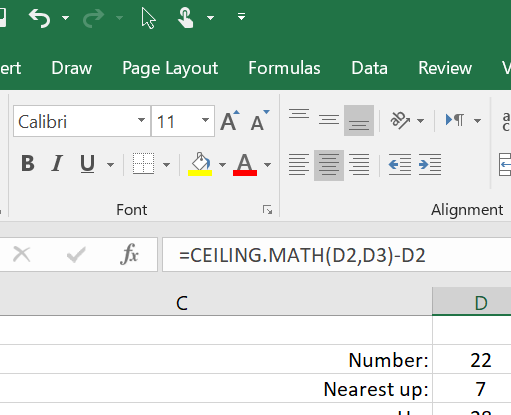
Below is an example of rounding the number in D2 which is 22 into the next 7 up, 7 is in D3, result is 28 as you can see

Read More “Limited Ceiling” »

Basic Math, CEILING, Formulas - combined functions, INT, Math and Trig, Standard functions

Recent Posts

  • Stale values (Scratched functions)
  • Middle name + 1st name
  • LastSunday, LastSaturday
  • Paste Special Percentage
  • Jan8 date format

Archives

Categories

  • Array formula (1)
  • Formulas – combined functions (58)
  • Google Sheets (2)
  • Non-functions (36)
    • ActiveX controls (2)
    • Conditional Formatting (7)
    • Data Validation (7)
    • Excel User tips (19)
    • Format Cells (6)
    • Graphics (4)
    • Names (3)
  • Standard functions (82)
    • Basic Math (18)
    • Date and Time (16)
      • DATE (9)
      • Hour (1)
      • MONTH (7)
      • NETWORKDAYS (2)
      • TODAY (7)
      • WEEKDAY (8)
      • WEEKNUM (1)
      • YEAR (8)
    • Engineering (1)
      • CONVERT (1)
    • Information (6)
      • CELL (4)
      • ISERROR (1)
      • N (1)
    • Logical (30)
      • AND (5)
      • IF (24)
      • IFERROR (6)
      • IFNA (1)
      • IFS (1)
      • ISERROR (1)
      • OR (2)
    • Lookup and References (36)
      • ADDRESS (4)
      • CHOOSE (3)
      • COLUMN (7)
      • FORMULATEXT (1)
      • HLOOKUP (1)
      • HYPERLINK (2)
      • INDEX (5)
      • INDIRECT (6)
      • MATCH (12)
      • OFFSET (15)
      • ROW (11)
      • VLOOKUP (5)
    • Math and Trig (24)
      • ABS (1)
      • CEILING (1)
      • COUNT (1)
      • COUNTA (4)
      • INT (9)
      • LARGE (2)
      • MAX (1)
      • Min (2)
      • SMALL (3)
      • SUM (3)
      • SUMIF (1)
      • SUMIFS (2)
      • SUMPRODUCT (1)
    • Statistical (5)
      • COUNTIF (4)
      • COUNTIFS (1)
    • Texts and Strings (24)
      • CHAR (5)
      • CONCATINATE (1)
      • FIND (1)
      • LEFT (8)
      • Len (4)
      • MID (9)
      • REPT (3)
      • RIGHT (2)
      • SEARCH (9)
      • STRING (1)
      • SUBSTITUTE (2)
      • TEXT (4)
      • TRIM (2)
      • VALUE (2)
  • Uncategorized (2)
  • User-Defined f(x)s = UDF (3)
    • HyperlinkOf (1)
  • Worksheet (16)
  • XLfxs (2)

Meta

  • Log in
  • Entries feed
  • Comments feed
  • WordPress.org
  • Stale values (Scratched functions) Excel User tips
  • Schedule column Basic Math
  • iframe in Excel (XLiFrame) ADDRESS
  • Looplist – Repeating months using formulas Basic Math
  • DayName Date and Time
  • Fx to cut long column into two columns Formulas - combined functions
  • WorksheetName and WorksheetsNo UDFs Lookup and References
  • State Abbr with Index+Match+Validation Data Validation

Copyright © 2026 Excel Functions.

Powered by PressBook News Dark theme