Skip to content

Excel Functions

Excel f(x)s = Excel Functions

  • Scorring, saving multiple outputs in 1 number Basic Math
  • Validation based on another Validation COUNTA
  • Change Calculator – calculate change in multiple bills/coins Formulas - combined functions
  • Tally chart in functions Formulas - combined functions
  • Recover the unrecoverable Excel User tips
  • OFFSET+MATCH Formulas - combined functions
  • Why I ran from =INDIRECT() function Formulas - combined functions
  • Week number to Month number DATE

Category: ISERROR

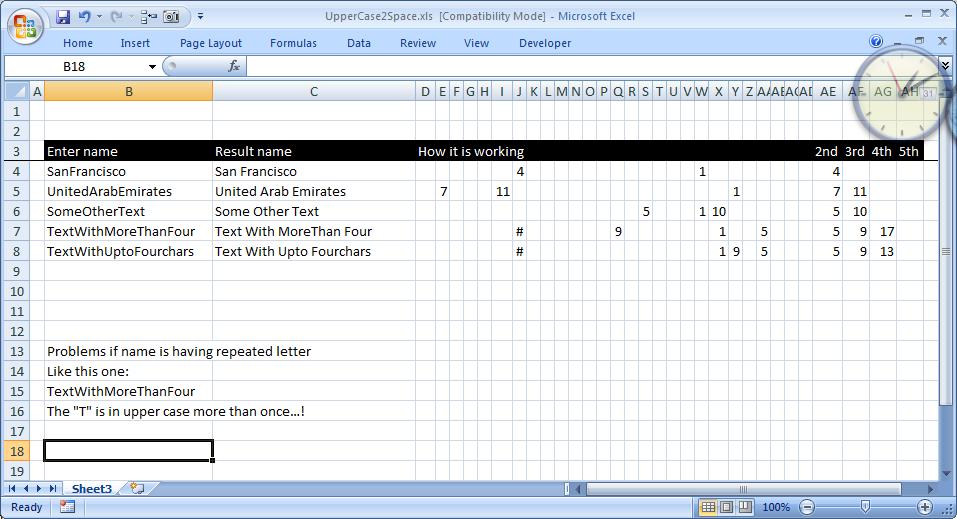
CamelCase to Camel Case

Posted on January 26, 2012 By ANmar No Comments on CamelCase to Camel Case
CamelCase to Camel Case

Here is a good practice for combining functions to get a full smartsheet It basically add a space before any capital letter in a text, helpful when you have strings without spaces and want to convert them. It is all in formulas. Put additional spaces before any upper case letter. made specially for custom request….

Read More “CamelCase to Camel Case” »

CHAR, FIND, Formulas - combined functions, IF, Information, ISERROR, Logical, Math and Trig, MID, SMALL, Standard functions, Texts and Strings, TRIM

Recent Posts

  • Stale values (Scratched functions)
  • Middle name + 1st name
  • LastSunday, LastSaturday
  • Paste Special Percentage
  • Jan8 date format

Archives

Categories

  • Array formula (1)
  • Formulas – combined functions (58)
  • Google Sheets (2)
  • Non-functions (36)
    • ActiveX controls (2)
    • Conditional Formatting (7)
    • Data Validation (7)
    • Excel User tips (19)
    • Format Cells (6)
    • Graphics (4)
    • Names (3)
  • Standard functions (82)
    • Basic Math (18)
    • Date and Time (16)
      • DATE (9)
      • Hour (1)
      • MONTH (7)
      • NETWORKDAYS (2)
      • TODAY (7)
      • WEEKDAY (8)
      • WEEKNUM (1)
      • YEAR (8)
    • Engineering (1)
      • CONVERT (1)
    • Information (6)
      • CELL (4)
      • ISERROR (1)
      • N (1)
    • Logical (30)
      • AND (5)
      • IF (24)
      • IFERROR (6)
      • IFNA (1)
      • IFS (1)
      • ISERROR (1)
      • OR (2)
    • Lookup and References (36)
      • ADDRESS (4)
      • CHOOSE (3)
      • COLUMN (7)
      • FORMULATEXT (1)
      • HLOOKUP (1)
      • HYPERLINK (2)
      • INDEX (5)
      • INDIRECT (6)
      • MATCH (12)
      • OFFSET (15)
      • ROW (11)
      • VLOOKUP (5)
    • Math and Trig (24)
      • ABS (1)
      • CEILING (1)
      • COUNT (1)
      • COUNTA (4)
      • INT (9)
      • LARGE (2)
      • MAX (1)
      • Min (2)
      • SMALL (3)
      • SUM (3)
      • SUMIF (1)
      • SUMIFS (2)
      • SUMPRODUCT (1)
    • Statistical (5)
      • COUNTIF (4)
      • COUNTIFS (1)
    • Texts and Strings (24)
      • CHAR (5)
      • CONCATINATE (1)
      • FIND (1)
      • LEFT (8)
      • Len (4)
      • MID (9)
      • REPT (3)
      • RIGHT (2)
      • SEARCH (9)
      • STRING (1)
      • SUBSTITUTE (2)
      • TEXT (4)
      • TRIM (2)
      • VALUE (2)
  • Uncategorized (2)
  • User-Defined f(x)s = UDF (3)
    • HyperlinkOf (1)
  • Worksheet (16)
  • XLfxs (2)

Meta

  • Log in
  • Entries feed
  • Comments feed
  • WordPress.org
  • IFS (and IFNA) to avoid nested IFs Formulas - combined functions
  • Calculate hours between two cells ABS
  • Get column name (columnname as A,B,C, etc) as input inside cell ADDRESS
  • Progress bar in pure functions CHAR
  • State Abbr with Index+Match+Validation Data Validation
  • Filter. Google Sheets function Google Sheets
  • When Excel tells you to go get some life Excel User tips
  • VLookup Lookup and References

Copyright © 2025 Excel Functions.

Powered by PressBook News Dark theme