
Skip to content

Excel Functions

Excel f(x)s = Excel Functions

  • Dynamic selection list ActiveX controls
  • Repeated Offset Basic Math
  • MATCH fumction, just a simple search Lookup and References
  • Text-to-Columns, dynamically using formulas IFERROR
  • CountIf limitation COUNTIF
  • Sort list dynamically (functions) COLUMN
  • Custom fiscal year calendar (CFlex) Basic Math
  • Edit directly in cell Excel User tips

Category: SUMIFS

Count cells with condition – multiple conditions

Posted on February 16, 2018 By ANmar
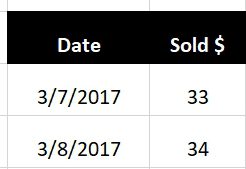
Count cells with condition – multiple conditions

We did see who we can get total of a column for a certain month in certain year using SUMIFS.

SUMIFS got a sister function, COUNTIFS

Which will count how many times cells found with more than 1 condition

So, when you have a table like this…

Read More “Count cells with condition – multiple conditions” »

COUNTIFS, Formulas - combined functions, Math and Trig, Statistical, SUMIFS

Get monthly total from table with dates

Posted on December 26, 2017 By ANmar
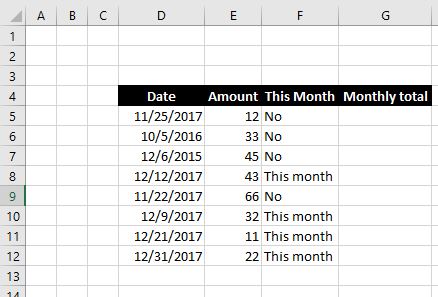
Get monthly total from table with dates

Again, thanks to one of my students, I am getting another post with example 🙂 I did promise her to post it after she sounded interesting in getting this example Here is an example on how to calculate total amounts of dollars per month (and number of days) from a table with dates The tricky…

Read More “Get monthly total from table with dates” »

DATE, MONTH, SUMIF, SUMIFS, YEAR

Recent Posts

  • Stale values (Scratched functions)
  • Middle name + 1st name
  • LastSunday, LastSaturday
  • Paste Special Percentage
  • Jan8 date format

Archives

Categories

  • Array formula (1)
  • Formulas – combined functions (58)
  • Google Sheets (2)
  • Non-functions (36)
    • ActiveX controls (2)
    • Conditional Formatting (7)
    • Data Validation (7)
    • Excel User tips (19)
    • Format Cells (6)
    • Graphics (4)
    • Names (3)
  • Standard functions (82)
    • Basic Math (18)
    • Date and Time (16)
      • DATE (9)
      • Hour (1)
      • MONTH (7)
      • NETWORKDAYS (2)
      • TODAY (7)
      • WEEKDAY (8)
      • WEEKNUM (1)
      • YEAR (8)
    • Engineering (1)
      • CONVERT (1)
    • Information (6)
      • CELL (4)
      • ISERROR (1)
      • N (1)
    • Logical (30)
      • AND (5)
      • IF (24)
      • IFERROR (6)
      • IFNA (1)
      • IFS (1)
      • ISERROR (1)
      • OR (2)
    • Lookup and References (36)
      • ADDRESS (4)
      • CHOOSE (3)
      • COLUMN (7)
      • FORMULATEXT (1)
      • HLOOKUP (1)
      • HYPERLINK (2)
      • INDEX (5)
      • INDIRECT (6)
      • MATCH (12)
      • OFFSET (15)
      • ROW (11)
      • VLOOKUP (5)
    • Math and Trig (24)
      • ABS (1)
      • CEILING (1)
      • COUNT (1)
      • COUNTA (4)
      • INT (9)
      • LARGE (2)
      • MAX (1)
      • Min (2)
      • SMALL (3)
      • SUM (3)
      • SUMIF (1)
      • SUMIFS (2)
      • SUMPRODUCT (1)
    • Statistical (5)
      • COUNTIF (4)
      • COUNTIFS (1)
    • Texts and Strings (24)
      • CHAR (5)
      • CONCATINATE (1)
      • FIND (1)
      • LEFT (8)
      • Len (4)
      • MID (9)
      • REPT (3)
      • RIGHT (2)
      • SEARCH (9)
      • STRING (1)
      • SUBSTITUTE (2)
      • TEXT (4)
      • TRIM (2)
      • VALUE (2)
  • Uncategorized (2)
  • User-Defined f(x)s = UDF (3)
    • HyperlinkOf (1)
  • Worksheet (16)
  • XLfxs (2)

Meta

  • Log in
  • Entries feed
  • Comments feed
  • WordPress.org
  • Recover the unrecoverable Excel User tips
  • Looplist – Repeating months using formulas Basic Math
  • VALUE() of LEFT() Formulas - combined functions
  • MATCH fumction, just a simple search Lookup and References
  • Week number to Sunday date – Weeknum reverse DATE
  • Jan8 date format AND
  • LastSunday, LastSaturday Date and Time
  • Why I ran from =INDIRECT() function Formulas - combined functions

Copyright © 2025 Excel Functions.

Powered by PressBook News Dark theme