Skip to content

Excel Functions

Excel f(x)s = Excel Functions

  • CamelCase to Camel Case CHAR
  • Count cells with condition – multiple conditions COUNTIFS
  • When Excel tells you to go get some life Excel User tips
  • Sorting with functions only CHOOSE
  • Always get 1st name (or last) Formulas - combined functions
  • Text-to-Columns, dynamically using formulas IFERROR
  • CONVERT function CONVERT
  • Expenses calendar, FaCal Basic Math

Category: Engineering

CONVERT function

Posted on September 26, 2016 By ANmar
CONVERT function

Excel 2010 has a lot of new exciting things, one of them is the ‘Engineering’ category of functions, this was usually a plugin we have to add to get, but in Excel 2010, it is already there.

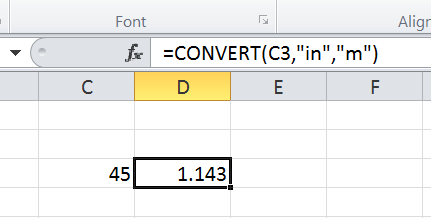
The function ‘Convert’ does what you expect it, converts a number from one metric to another.

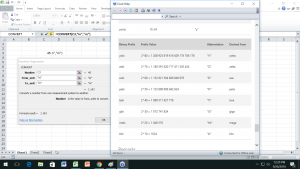
Of course, we cannot remember all metric systems and units, so just press F1, or click help to see this list to know how you can convert from one unit to another in any of the systems inside that function

The one I most interested is

=Convert( 45, "mi", "km")
convert5

More images …

Read More “CONVERT function” »

CONVERT, Engineering, Standard functions

Recent Posts

  • Stale values (Scratched functions)
  • Middle name + 1st name
  • LastSunday, LastSaturday
  • Paste Special Percentage
  • Jan8 date format

Archives

Categories

  • Array formula (1)
  • Formulas – combined functions (58)
  • Google Sheets (2)
  • Non-functions (36)
    • ActiveX controls (2)
    • Conditional Formatting (7)
    • Data Validation (7)
    • Excel User tips (19)
    • Format Cells (6)
    • Graphics (4)
    • Names (3)
  • Standard functions (82)
    • Basic Math (18)
    • Date and Time (16)
      • DATE (9)
      • Hour (1)
      • MONTH (7)
      • NETWORKDAYS (2)
      • TODAY (7)
      • WEEKDAY (8)
      • WEEKNUM (1)
      • YEAR (8)
    • Engineering (1)
      • CONVERT (1)
    • Information (6)
      • CELL (4)
      • ISERROR (1)
      • N (1)
    • Logical (30)
      • AND (5)
      • IF (24)
      • IFERROR (6)
      • IFNA (1)
      • IFS (1)
      • ISERROR (1)
      • OR (2)
    • Lookup and References (36)
      • ADDRESS (4)
      • CHOOSE (3)
      • COLUMN (7)
      • FORMULATEXT (1)
      • HLOOKUP (1)
      • HYPERLINK (2)
      • INDEX (5)
      • INDIRECT (6)
      • MATCH (12)
      • OFFSET (15)
      • ROW (11)
      • VLOOKUP (5)
    • Math and Trig (24)
      • ABS (1)
      • CEILING (1)
      • COUNT (1)
      • COUNTA (4)
      • INT (9)
      • LARGE (2)
      • MAX (1)
      • Min (2)
      • SMALL (3)
      • SUM (3)
      • SUMIF (1)
      • SUMIFS (2)
      • SUMPRODUCT (1)
    • Statistical (5)
      • COUNTIF (4)
      • COUNTIFS (1)
    • Texts and Strings (24)
      • CHAR (5)
      • CONCATINATE (1)
      • FIND (1)
      • LEFT (8)
      • Len (4)
      • MID (9)
      • REPT (3)
      • RIGHT (2)
      • SEARCH (9)
      • STRING (1)
      • SUBSTITUTE (2)
      • TEXT (4)
      • TRIM (2)
      • VALUE (2)
  • Uncategorized (2)
  • User-Defined f(x)s = UDF (3)
    • HyperlinkOf (1)
  • Worksheet (16)
  • XLfxs (2)

Meta

  • Log in
  • Entries feed
  • Comments feed
  • WordPress.org
  • Multiple lines in cell using functions CHAR
  • Change Calculator – calculate change in multiple bills/coins Formulas - combined functions
  • 0% interest promotion Basic Math
  • Count how many times letter found Formulas - combined functions
  • Convert cell into textbox Excel User tips
  • UDF – Convert Number into text (English and Arabic) User-Defined f(x)s = UDF
  • Dynamic selection list ActiveX controls
  • New function IFERROR, finally IFERROR

Copyright © 2026 Excel Functions.

Powered by PressBook News Dark theme