Skip to content

Excel Functions

Excel f(x)s = Excel Functions

  • Shapes with dynamic output Excel User tips
  • GoLast to jump to last cell in a column CELL
  • Progress bar in pure functions CHAR
  • Blank (isempty) VS “” (null string) Excel User tips
  • Multiple-Validations (connected to each other) Data Validation
  • IF with AND and IF with OR AND
  • Multiple lines in cell using functions CHAR
  • Excel @ before function names in formulas Excel User tips

CountIf limitation

Posted on March 30, 2020 By ANmar

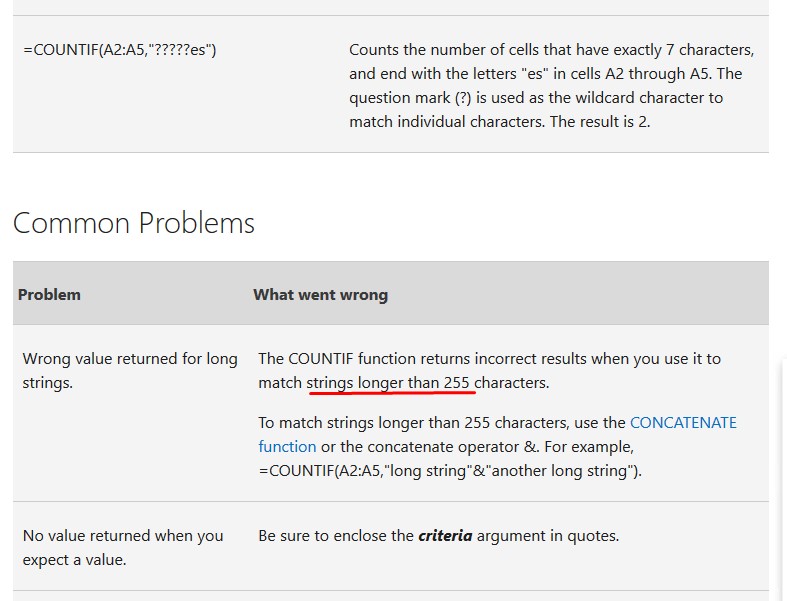
CountIF function cannot search for text longer than 255 chars.

This is mainly found here …

https://support.office.com/en-us/article/COUNTIF-function-E0DE10C6-F885-4E71-ABB4-1F464816DF34
COUNTIF, Standard functions, Statistical

Post navigation

Previous Post: CHOOSE – tree of decisions
Next Post: GoLast to jump to last cell in a column

Related Posts

  • Extract current (Active) workbook name CELL
  • Fx to cut long column into two columns Formulas - combined functions
  • Extract Address into table Formulas - combined functions
  • Count cells with condition – multiple conditions COUNTIFS
  • Return 12 values in one number AND
  • FORMULATEXT to show formulas FORMULATEXT

Recent Posts

  • Stale values (Scratched functions)
  • Middle name + 1st name
  • LastSunday, LastSaturday
  • Paste Special Percentage
  • Jan8 date format

Archives

Categories

  • Array formula (1)
  • Formulas – combined functions (58)
  • Google Sheets (2)
  • Non-functions (36)
    • ActiveX controls (2)
    • Conditional Formatting (7)
    • Data Validation (7)
    • Excel User tips (19)
    • Format Cells (6)
    • Graphics (4)
    • Names (3)
  • Standard functions (82)
    • Basic Math (18)
    • Date and Time (16)
      • DATE (9)
      • Hour (1)
      • MONTH (7)
      • NETWORKDAYS (2)
      • TODAY (7)
      • WEEKDAY (8)
      • WEEKNUM (1)
      • YEAR (8)
    • Engineering (1)
      • CONVERT (1)
    • Information (6)
      • CELL (4)
      • ISERROR (1)
      • N (1)
    • Logical (30)
      • AND (5)
      • IF (24)
      • IFERROR (6)
      • IFNA (1)
      • IFS (1)
      • ISERROR (1)
      • OR (2)
    • Lookup and References (36)
      • ADDRESS (4)
      • CHOOSE (3)
      • COLUMN (7)
      • FORMULATEXT (1)
      • HLOOKUP (1)
      • HYPERLINK (2)
      • INDEX (5)
      • INDIRECT (6)
      • MATCH (12)
      • OFFSET (15)
      • ROW (11)
      • VLOOKUP (5)
    • Math and Trig (24)
      • ABS (1)
      • CEILING (1)
      • COUNT (1)
      • COUNTA (4)
      • INT (9)
      • LARGE (2)
      • MAX (1)
      • Min (2)
      • SMALL (3)
      • SUM (3)
      • SUMIF (1)
      • SUMIFS (2)
      • SUMPRODUCT (1)
    • Statistical (5)
      • COUNTIF (4)
      • COUNTIFS (1)
    • Texts and Strings (24)
      • CHAR (5)
      • CONCATINATE (1)
      • FIND (1)
      • LEFT (8)
      • Len (4)
      • MID (9)
      • REPT (3)
      • RIGHT (2)
      • SEARCH (9)
      • STRING (1)
      • SUBSTITUTE (2)
      • TEXT (4)
      • TRIM (2)
      • VALUE (2)
  • Uncategorized (2)
  • User-Defined f(x)s = UDF (3)
    • HyperlinkOf (1)
  • Worksheet (16)
  • XLfxs (2)

Meta

  • Log in
  • Entries feed
  • Comments feed
  • WordPress.org
  • DayName Date and Time
  • iframe in Excel (XLiFrame) ADDRESS
  • Compare2, a tool to compare two sheets using formulas Conditional Formatting
  • Sum of divide – Array formula Array formula
  • State Abbr with Index+Match+Validation Data Validation
  • Cells with additional spaces AND
  • Recover the unrecoverable Excel User tips
  • Excel Limits Excel User tips

Copyright © 2026 Excel Functions.

Powered by PressBook News Dark theme