Skip to content

Excel Functions

Excel f(x)s = Excel Functions

  • Standard math to calculate Aspect Ratio Basic Math
  • 6174 Kaprekar’s constant Basic Math
  • Shapes with dynamic output Excel User tips
  • Search across sheets in function ADDRESS
  • Extract Address into table Formulas - combined functions
  • Convert cell into textbox Excel User tips
  • Multiple Dual-Validations COUNTA
  • Sorting with functions only CHOOSE

Category: FIND

CamelCase to Camel Case
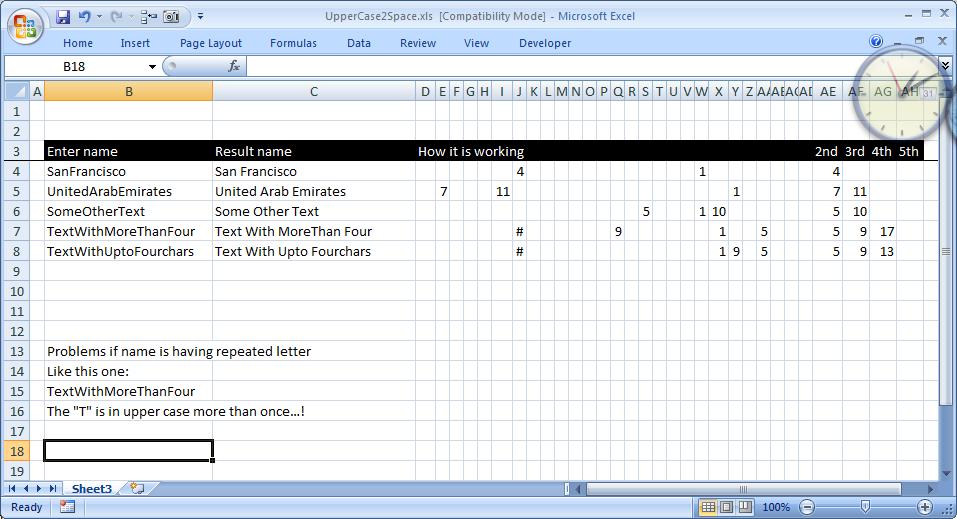
Posted on January 26, 2012 By ANmar No Comments on CamelCase to Camel Case
CamelCase to Camel Case

Here is a good practice for combining functions to get a full smartsheet It basically add a space before any capital letter in a text, helpful when you have strings without spaces and want to convert them. It is all in formulas. Put additional spaces before any upper case letter. made specially for custom request….

Read More “CamelCase to Camel Case” »

CHAR, FIND, Formulas - combined functions, IF, Information, ISERROR, Logical, Math and Trig, MID, SMALL, Standard functions, Texts and Strings, TRIM

Recent Posts

  • Stale values (Scratched functions)
  • Middle name + 1st name
  • LastSunday, LastSaturday
  • Paste Special Percentage
  • Jan8 date format

Archives

Categories

  • Array formula (1)
  • Formulas – combined functions (58)
  • Google Sheets (2)
  • Non-functions (36)
    • ActiveX controls (2)
    • Conditional Formatting (7)
    • Data Validation (7)
    • Excel User tips (19)
    • Format Cells (6)
    • Graphics (4)
    • Names (3)
  • Standard functions (82)
    • Basic Math (18)
    • Date and Time (16)
      • DATE (9)
      • Hour (1)
      • MONTH (7)
      • NETWORKDAYS (2)
      • TODAY (7)
      • WEEKDAY (8)
      • WEEKNUM (1)
      • YEAR (8)
    • Engineering (1)
      • CONVERT (1)
    • Information (6)
      • CELL (4)
      • ISERROR (1)
      • N (1)
    • Logical (30)
      • AND (5)
      • IF (24)
      • IFERROR (6)
      • IFNA (1)
      • IFS (1)
      • ISERROR (1)
      • OR (2)
    • Lookup and References (36)
      • ADDRESS (4)
      • CHOOSE (3)
      • COLUMN (7)
      • FORMULATEXT (1)
      • HLOOKUP (1)
      • HYPERLINK (2)
      • INDEX (5)
      • INDIRECT (6)
      • MATCH (12)
      • OFFSET (15)
      • ROW (11)
      • VLOOKUP (5)
    • Math and Trig (24)
      • ABS (1)
      • CEILING (1)
      • COUNT (1)
      • COUNTA (4)
      • INT (9)
      • LARGE (2)
      • MAX (1)
      • Min (2)
      • SMALL (3)
      • SUM (3)
      • SUMIF (1)
      • SUMIFS (2)
      • SUMPRODUCT (1)
    • Statistical (5)
      • COUNTIF (4)
      • COUNTIFS (1)
    • Texts and Strings (24)
      • CHAR (5)
      • CONCATINATE (1)
      • FIND (1)
      • LEFT (8)
      • Len (4)
      • MID (9)
      • REPT (3)
      • RIGHT (2)
      • SEARCH (9)
      • STRING (1)
      • SUBSTITUTE (2)
      • TEXT (4)
      • TRIM (2)
      • VALUE (2)
  • Uncategorized (2)
  • User-Defined f(x)s = UDF (3)
    • HyperlinkOf (1)
  • Worksheet (16)
  • XLfxs (2)

Meta

  • Log in
  • Entries feed
  • Comments feed
  • WordPress.org
  • 6174 Kaprekar’s constant Basic Math
  • Dynamic selection list ActiveX controls
  • Excel Functions = XL f(x)s XLfxs
  • Cell formats 0.0\% and 0.0%;(0.0%) Format Cells
  • Extract current (Active) workbook name CELL
  • Multiple Dual-Validations COUNTA
  • Fx to cut long column into two columns Formulas - combined functions
  • CountIf limitation COUNTIF

Copyright © 2026 Excel Functions.

Powered by PressBook News Dark theme