


Skip to content

Excel Functions

Excel f(x)s = Excel Functions

  • Excel @ before function names in formulas Excel User tips
  • Walking Columns ActiveX controls
  • Fx to cut long column into two columns Formulas - combined functions
  • VLookup Lookup and References
  • DayName Date and Time
  • Stale values (Scratched functions) Excel User tips
  • Cell formats 0.0\% and 0.0%;(0.0%) Format Cells
  • Change Calculator – calculate change in multiple bills/coins Formulas - combined functions

Tag: identifier

CHOOSE – tree of decisions
Posted on February 20, 2020 By ANmar
CHOOSE – tree of decisions

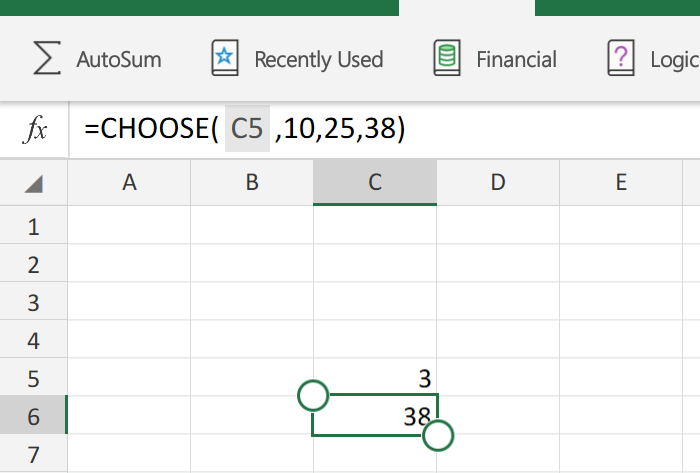
If you are like me, then you must have needed to use CHOOSE functionThis is basically like “SELECT CASE” statement, but more limited So, in few words, you can derive the flow of formulas to go to function1, function2, function3, or function4 based on an integer.More like a nested IF, it can actually replaces a…

Read More “CHOOSE – tree of decisions” »

CHOOSE, Formulas - combined functions, IF

Recent Posts

  • Stale values (Scratched functions)
  • Middle name + 1st name
  • LastSunday, LastSaturday
  • Paste Special Percentage
  • Jan8 date format

Archives

Categories

  • Array formula (1)
  • Formulas – combined functions (58)
  • Google Sheets (2)
  • Non-functions (36)
    • ActiveX controls (2)
    • Conditional Formatting (7)
    • Data Validation (7)
    • Excel User tips (19)
    • Format Cells (6)
    • Graphics (4)
    • Names (3)
  • Standard functions (82)
    • Basic Math (18)
    • Date and Time (16)
      • DATE (9)
      • Hour (1)
      • MONTH (7)
      • NETWORKDAYS (2)
      • TODAY (7)
      • WEEKDAY (8)
      • WEEKNUM (1)
      • YEAR (8)
    • Engineering (1)
      • CONVERT (1)
    • Information (6)
      • CELL (4)
      • ISERROR (1)
      • N (1)
    • Logical (30)
      • AND (5)
      • IF (24)
      • IFERROR (6)
      • IFNA (1)
      • IFS (1)
      • ISERROR (1)
      • OR (2)
    • Lookup and References (36)
      • ADDRESS (4)
      • CHOOSE (3)
      • COLUMN (7)
      • FORMULATEXT (1)
      • HLOOKUP (1)
      • HYPERLINK (2)
      • INDEX (5)
      • INDIRECT (6)
      • MATCH (12)
      • OFFSET (15)
      • ROW (11)
      • VLOOKUP (5)
    • Math and Trig (24)
      • ABS (1)
      • CEILING (1)
      • COUNT (1)
      • COUNTA (4)
      • INT (9)
      • LARGE (2)
      • MAX (1)
      • Min (2)
      • SMALL (3)
      • SUM (3)
      • SUMIF (1)
      • SUMIFS (2)
      • SUMPRODUCT (1)
    • Statistical (5)
      • COUNTIF (4)
      • COUNTIFS (1)
    • Texts and Strings (24)
      • CHAR (5)
      • CONCATINATE (1)
      • FIND (1)
      • LEFT (8)
      • Len (4)
      • MID (9)
      • REPT (3)
      • RIGHT (2)
      • SEARCH (9)
      • STRING (1)
      • SUBSTITUTE (2)
      • TEXT (4)
      • TRIM (2)
      • VALUE (2)
  • Uncategorized (2)
  • User-Defined f(x)s = UDF (3)
    • HyperlinkOf (1)
  • Worksheet (16)
  • XLfxs (2)

Meta

  • Log in
  • Entries feed
  • Comments feed
  • WordPress.org
  • Middle name + 1st name Basic Math
  • Links between two workbooks – dynamically using functions INDIRECT
  • Hello world! Uncategorized
  • Stale values (Scratched functions) Excel User tips
  • The Excel “&” bug Excel User tips
  • 0% interest promotion Basic Math
  • VALUE() of LEFT() Formulas - combined functions
  • Shapes with dynamic output Excel User tips

Copyright © 2025 Excel Functions.

Powered by PressBook News Dark theme