

Skip to content

Excel Functions

Excel f(x)s = Excel Functions

  • Recover the unrecoverable Excel User tips
  • GoLast to jump to last cell in a column CELL
  • Zipcode-State search Formulas - combined functions
  • Why I ran from =INDIRECT() function Formulas - combined functions
  • Always get 1st name (or last) Formulas - combined functions
  • Unix DateTime Number Basic Math
  • CamelCase to Camel Case CHAR
  • Multiple lines in cell using functions CHAR

Tag: MID

Middle name + 1st name

Posted on February 3, 2024 By ANmar
Middle name + 1st name

Get the initial (middle name) from a triple name in a cell.
C4 The cell contains the triple name separated with spaces.
=LEFT(C4,1) & "." & MID(C4, SEARCH(" ", C4, 1) + 1, 1) & "." & MID(C4, SEARCH(" ", C4, SEARCH(" ", C4, 1) + 1) + 1, 1) & "."

Read More “Middle name + 1st name” »

Basic Math, Formulas - combined functions, LEFT, MID, SEARCH, Standard functions, Texts and Strings

Cuts string of list of items

Posted on August 17, 2022 By ANmar
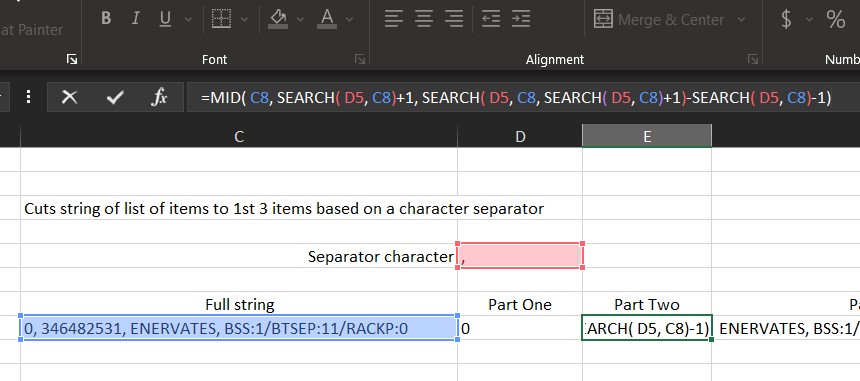
Cuts string of list of items

An old lesson to one of my early classes to show how can we cut a string having list of items into its parts. (At least 1st three parts) using formulas only.

Read More “Cuts string of list of items” »

Formulas - combined functions, LEFT, MID, SEARCH, Standard functions, Texts and Strings

Recent Posts

  • Stale values (Scratched functions)
  • Middle name + 1st name
  • LastSunday, LastSaturday
  • Paste Special Percentage
  • Jan8 date format

Archives

Categories

  • Array formula (1)
  • Formulas – combined functions (58)
  • Google Sheets (2)
  • Non-functions (36)
    • ActiveX controls (2)
    • Conditional Formatting (7)
    • Data Validation (7)
    • Excel User tips (19)
    • Format Cells (6)
    • Graphics (4)
    • Names (3)
  • Standard functions (82)
    • Basic Math (18)
    • Date and Time (16)
      • DATE (9)
      • Hour (1)
      • MONTH (7)
      • NETWORKDAYS (2)
      • TODAY (7)
      • WEEKDAY (8)
      • WEEKNUM (1)
      • YEAR (8)
    • Engineering (1)
      • CONVERT (1)
    • Information (6)
      • CELL (4)
      • ISERROR (1)
      • N (1)
    • Logical (30)
      • AND (5)
      • IF (24)
      • IFERROR (6)
      • IFNA (1)
      • IFS (1)
      • ISERROR (1)
      • OR (2)
    • Lookup and References (36)
      • ADDRESS (4)
      • CHOOSE (3)
      • COLUMN (7)
      • FORMULATEXT (1)
      • HLOOKUP (1)
      • HYPERLINK (2)
      • INDEX (5)
      • INDIRECT (6)
      • MATCH (12)
      • OFFSET (15)
      • ROW (11)
      • VLOOKUP (5)
    • Math and Trig (24)
      • ABS (1)
      • CEILING (1)
      • COUNT (1)
      • COUNTA (4)
      • INT (9)
      • LARGE (2)
      • MAX (1)
      • Min (2)
      • SMALL (3)
      • SUM (3)
      • SUMIF (1)
      • SUMIFS (2)
      • SUMPRODUCT (1)
    • Statistical (5)
      • COUNTIF (4)
      • COUNTIFS (1)
    • Texts and Strings (24)
      • CHAR (5)
      • CONCATINATE (1)
      • FIND (1)
      • LEFT (8)
      • Len (4)
      • MID (9)
      • REPT (3)
      • RIGHT (2)
      • SEARCH (9)
      • STRING (1)
      • SUBSTITUTE (2)
      • TEXT (4)
      • TRIM (2)
      • VALUE (2)
  • Uncategorized (2)
  • User-Defined f(x)s = UDF (3)
    • HyperlinkOf (1)
  • Worksheet (16)
  • XLfxs (2)

Meta

  • Log in
  • Entries feed
  • Comments feed
  • WordPress.org
  • IF with AND and IF with OR AND
  • Convert cell into textbox Excel User tips
  • Excel Functions = XL f(x)s XLfxs
  • Scorring, saving multiple outputs in 1 number Basic Math
  • Formula Beautifier Excel User tips
  • Custom fiscal year calendar (CFlex) Basic Math
  • Blank (isempty) VS “” (null string) Excel User tips
  • Excel Limits Excel User tips

Copyright © 2026 Excel Functions.

Powered by PressBook News Dark theme