
Skip to content

Excel Functions

Excel f(x)s = Excel Functions

  • IFS (and IFNA) to avoid nested IFs Formulas - combined functions
  • iframe in Excel (XLiFrame) ADDRESS
  • UDF – Convert Number into text (English and Arabic) User-Defined f(x)s = UDF
  • Excel @ before function names in formulas Excel User tips
  • Extract Address into table Formulas - combined functions
  • Week number to Month number DATE
  • Week number to Sunday date – Weeknum reverse DATE
  • When Excel tells you to go get some life Excel User tips

Always get 1st name (or last)

Posted on July 23, 2022 By ANmar

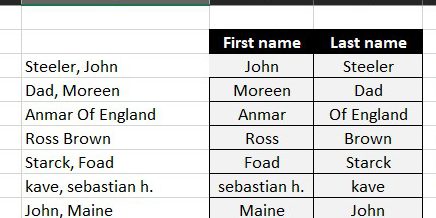
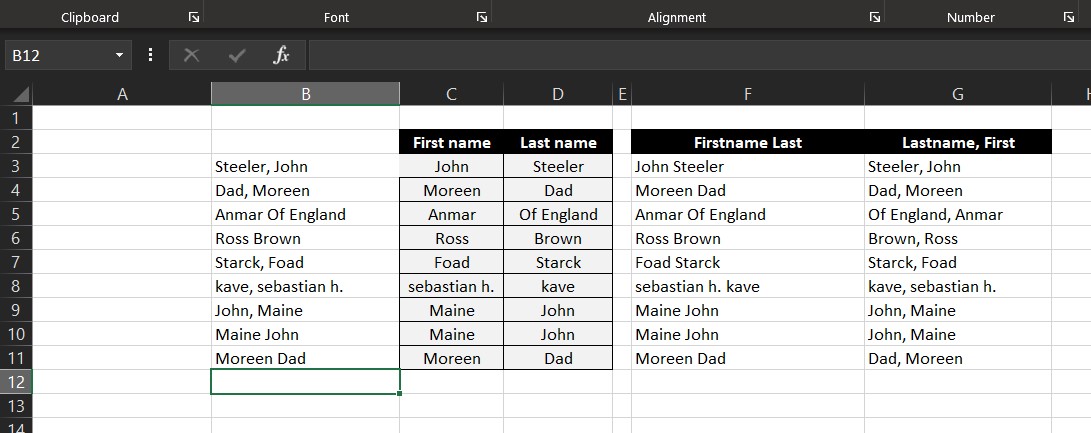
Formula to get first name from 2 formats either (Lastname, First) or (Firstname Last) formats.

You can then have a formula to show it in the format you need.

This one uses an old technique using function ISERROR, since it was created before the formula IFERROR was added to Excel. I bet we can have a better version now 🙂
Excel Online
Download
Formulas - combined functions, IF, ISERROR, LEFT, Len, Logical, RIGHT, SEARCH, Standard functions, Texts and Strings, TRIM Tags:IF, ISERROR, LEFT, LEN, RIGHT, Search, TRIM

Post navigation

Previous Post: Search across sheets in function
Next Post: Searching table in 2 dimensions.

Related Posts

  • Min Max vehicle Formulas - combined functions
  • DayName Date and Time
  • Unix DateTime Number Basic Math
  • MID + SEARCH to convert cell to rows MID
  • SimpleANBox Basic Math
  • Walking Columns ActiveX controls

Recent Posts

  • Stale values (Scratched functions)
  • Middle name + 1st name
  • LastSunday, LastSaturday
  • Paste Special Percentage
  • Jan8 date format

Archives

Categories

  • Array formula (1)
  • Formulas – combined functions (58)
  • Google Sheets (2)
  • Non-functions (36)
    • ActiveX controls (2)
    • Conditional Formatting (7)
    • Data Validation (7)
    • Excel User tips (19)
    • Format Cells (6)
    • Graphics (4)
    • Names (3)
  • Standard functions (82)
    • Basic Math (18)
    • Date and Time (16)
      • DATE (9)
      • Hour (1)
      • MONTH (7)
      • NETWORKDAYS (2)
      • TODAY (7)
      • WEEKDAY (8)
      • WEEKNUM (1)
      • YEAR (8)
    • Engineering (1)
      • CONVERT (1)
    • Information (6)
      • CELL (4)
      • ISERROR (1)
      • N (1)
    • Logical (30)
      • AND (5)
      • IF (24)
      • IFERROR (6)
      • IFNA (1)
      • IFS (1)
      • ISERROR (1)
      • OR (2)
    • Lookup and References (36)
      • ADDRESS (4)
      • CHOOSE (3)
      • COLUMN (7)
      • FORMULATEXT (1)
      • HLOOKUP (1)
      • HYPERLINK (2)
      • INDEX (5)
      • INDIRECT (6)
      • MATCH (12)
      • OFFSET (15)
      • ROW (11)
      • VLOOKUP (5)
    • Math and Trig (24)
      • ABS (1)
      • CEILING (1)
      • COUNT (1)
      • COUNTA (4)
      • INT (9)
      • LARGE (2)
      • MAX (1)
      • Min (2)
      • SMALL (3)
      • SUM (3)
      • SUMIF (1)
      • SUMIFS (2)
      • SUMPRODUCT (1)
    • Statistical (5)
      • COUNTIF (4)
      • COUNTIFS (1)
    • Texts and Strings (24)
      • CHAR (5)
      • CONCATINATE (1)
      • FIND (1)
      • LEFT (8)
      • Len (4)
      • MID (9)
      • REPT (3)
      • RIGHT (2)
      • SEARCH (9)
      • STRING (1)
      • SUBSTITUTE (2)
      • TEXT (4)
      • TRIM (2)
      • VALUE (2)
  • Uncategorized (2)
  • User-Defined f(x)s = UDF (3)
    • HyperlinkOf (1)
  • Worksheet (16)
  • XLfxs (2)

Meta

  • Log in
  • Entries feed
  • Comments feed
  • WordPress.org
  • Looplist – Repeating months using formulas Basic Math
  • Sorting with functions only CHOOSE
  • Why I ran from =INDIRECT() function Formulas - combined functions
  • SimpleANBox Basic Math
  • CountIf limitation COUNTIF
  • Excel Dynamic Drop-Downs that grow with you COUNTA
  • Cuts string of list of items Formulas - combined functions
  • Text-to-Columns, dynamically using formulas IFERROR

Copyright © 2025 Excel Functions.

Powered by PressBook News Dark theme