Skip to content

Excel Functions

Excel f(x)s = Excel Functions

  • IFS (and IFNA) to avoid nested IFs Formulas - combined functions
  • Why I ran from =INDIRECT() function Formulas - combined functions
  • Jan8 date format AND
  • BMI Calculator Basic Math
  • Searching table in 2 dimensions. Formulas - combined functions
  • Convert cell into textbox Excel User tips
  • Min Max vehicle Formulas - combined functions
  • Excel sessions – 2013 VS 2010 Excel User tips

Tag: Search

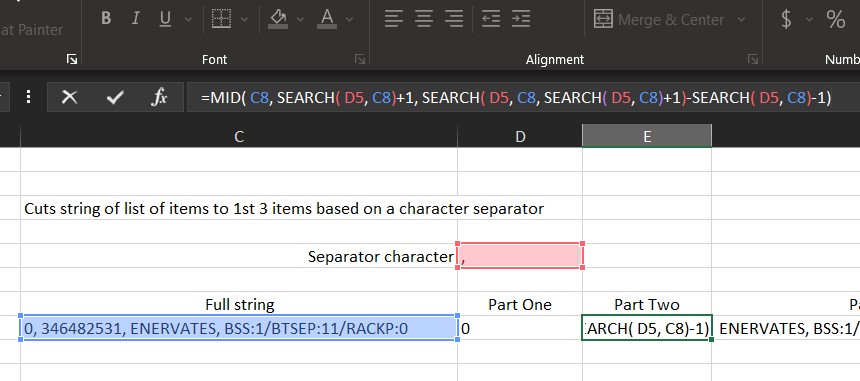
Cuts string of list of items

Posted on August 17, 2022 By ANmar
Cuts string of list of items

An old lesson to one of my early classes to show how can we cut a string having list of items into its parts. (At least 1st three parts) using formulas only.

Read More “Cuts string of list of items” »

Formulas - combined functions, LEFT, MID, SEARCH, Standard functions, Texts and Strings

Searching table in 2 dimensions.

Posted on July 26, 2022 By ANmar
Searching table in 2 dimensions.

Using VLOOKUP + MATCH (HLOOKUP + MATCH, OFFSET + 2 MATCHes or INDEX + 2 MATCHes) to search a table in both axis.

This post has been sitting for a while in my archive, waiting for me to get some time to polish and post.

Read More “Searching table in 2 dimensions.” »

Formulas - combined functions, HLOOKUP, INDEX, Lookup and References, MATCH, Standard functions, VLOOKUP

Always get 1st name (or last)

Posted on July 23, 2022 By ANmar
Always get 1st name (or last)

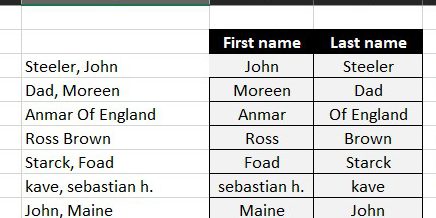
Formula to get first name from 2 formats either (Lastname, First) or (Firstname Last) formats.

Read More “Always get 1st name (or last)” »

Formulas - combined functions, IF, ISERROR, LEFT, Len, Logical, RIGHT, SEARCH, Standard functions, Texts and Strings, TRIM

Recent Posts

  • Calculate above and below me
  • Stale values (Scratched functions)
  • Middle name + 1st name
  • LastSunday, LastSaturday
  • Paste Special Percentage

Archives

Categories

  • Array formula (1)
  • Formulas – combined functions (58)
  • Google Sheets (2)
  • Non-functions (36)
    • ActiveX controls (2)
    • Conditional Formatting (7)
    • Data Validation (7)
    • Excel User tips (19)
    • Format Cells (6)
    • Graphics (4)
    • Names (3)
  • Standard functions (83)
    • Basic Math (18)
    • Date and Time (16)
      • DATE (9)
      • Hour (1)
      • MONTH (7)
      • NETWORKDAYS (2)
      • TODAY (7)
      • WEEKDAY (8)
      • WEEKNUM (1)
      • YEAR (8)
    • Engineering (1)
      • CONVERT (1)
    • Information (6)
      • CELL (4)
      • ISERROR (1)
      • N (1)
    • Logical (31)
      • AND (5)
      • IF (25)
      • IFERROR (7)
      • IFNA (1)
      • IFS (1)
      • ISERROR (1)
      • OR (2)
    • Lookup and References (36)
      • ADDRESS (4)
      • CHOOSE (3)
      • COLUMN (7)
      • FORMULATEXT (1)
      • HLOOKUP (1)
      • HYPERLINK (2)
      • INDEX (5)
      • INDIRECT (6)
      • MATCH (12)
      • OFFSET (15)
      • ROW (11)
      • VLOOKUP (5)
    • Math and Trig (24)
      • ABS (1)
      • CEILING (1)
      • COUNT (1)
      • COUNTA (4)
      • INT (9)
      • LARGE (2)
      • MAX (1)
      • Min (2)
      • SMALL (3)
      • SUM (3)
      • SUMIF (1)
      • SUMIFS (2)
      • SUMPRODUCT (1)
    • Statistical (6)
      • Average (1)
      • COUNTIF (4)
      • COUNTIFS (1)
    • Texts and Strings (24)
      • CHAR (5)
      • CONCATINATE (1)
      • FIND (1)
      • LEFT (8)
      • Len (4)
      • MID (9)
      • REPT (3)
      • RIGHT (2)
      • SEARCH (9)
      • STRING (1)
      • SUBSTITUTE (2)
      • TEXT (4)
      • TRIM (2)
      • VALUE (2)
  • Uncategorized (2)
  • User-Defined f(x)s = UDF (3)
    • HyperlinkOf (1)
  • Worksheet (16)
  • XLfxs (2)

Meta

  • Log in
  • Entries feed
  • Comments feed
  • WordPress.org
  • New function IFERROR, finally IFERROR
  • Get column name (columnname as A,B,C, etc) as input inside cell ADDRESS
  • Limited Ceiling Basic Math
  • CTRL+Y a mini macro Excel User tips
  • Multiple lines in cell using functions CHAR
  • Blank (isempty) VS “” (null string) Excel User tips
  • LastSunday, LastSaturday Date and Time
  • Comments versus Notes Excel User tips

Copyright © 2026 Excel Functions.

Powered by PressBook News Dark theme