


Skip to content

Excel Functions

Excel f(x)s = Excel Functions

  • Blank (isempty) VS “” (null string) Excel User tips
  • OFFSET+MATCH Formulas - combined functions
  • FORMULATEXT to show formulas FORMULATEXT
  • Text-to-Columns, dynamically using formulas IFERROR
  • Fx to cut long column into two columns Formulas - combined functions
  • Highlight dates dynamically AND
  • Excel Limits Excel User tips
  • LastSunday, LastSaturday Date and Time

Tag: OFFSET

Repeated Offset

Posted on September 19, 2022 By ANmar
Repeated Offset

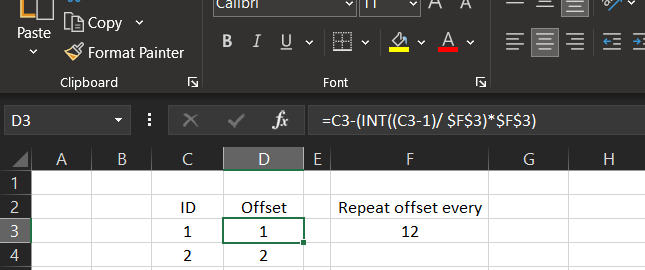
I needed to have an offset of columns to be repeated every 12 months.

This is part of a project, we needed to calculate the coefficient of sales prediction based on the month number, we do have coefficient saved in another table that repeated every year (12 months).

Read More “Repeated Offset” »

Basic Math, COLUMN, Formulas - combined functions, IFERROR, INT, Logical, Lookup and References, Math and Trig, OFFSET, Standard functions

Search across sheets in function

Posted on July 22, 2022 By ANmar
Search across sheets in function

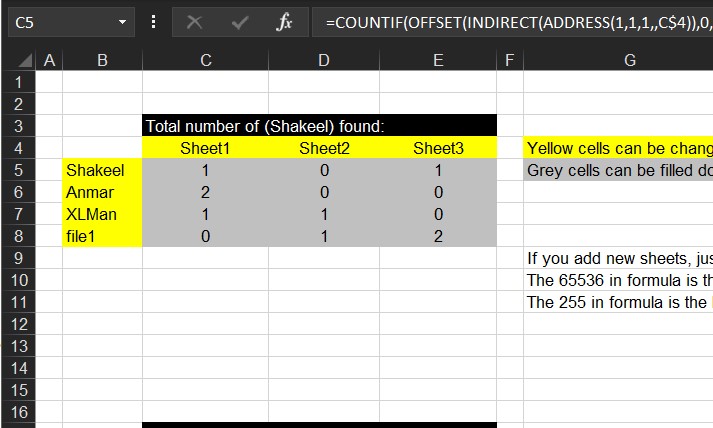
Just when you need to search for a thing across sheets in a workbook.

I am bored, so I am adding articles from my old archive.

Read More “Search across sheets in function” »

ADDRESS, COUNTIF, Formulas - combined functions, INDIRECT, Lookup and References, OFFSET, Standard functions, Statistical

Min Max vehicle

Posted on July 20, 2022 By ANmar
Min Max vehicle

Finding which vehicle with minimum (or maximum) amount of savings among peers.

This is an old request, found its formula in my archive to calculate which of the 4 columns is actually has the minimum (or maximum) of savings among other columns.

Trick is as you guessed it was OFFSET.

Read More “Min Max vehicle” »

Formulas - combined functions, Lookup and References, MATCH, Math and Trig, MAX, Min, OFFSET, Standard functions

OFFSET+MATCH

Posted on June 9, 2017 By ANmar
OFFSET+MATCH

One of the power of combining functions in one cell is using the best of these functions

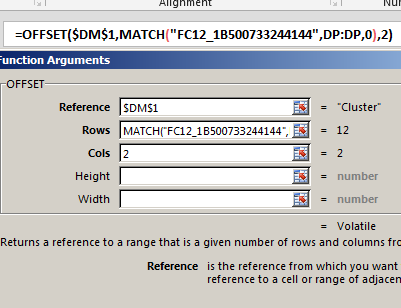
An example is here, OFFSET + MATCH will allow you to do something similar to VLOOKUP.

Why do we want to do that?

VLOOKUP will search in the left-most column in a table to get a value from a column on the right. But this is not the situation all the time

We needed several times to locate a row by using a column on the right, then get the value from a column left to it.

This is when VLOOKUP can not help us.

Read More “OFFSET+MATCH” »

Formulas - combined functions, Lookup and References, MATCH, OFFSET, Standard functions

Recent Posts

  • Calculate above and below me
  • Stale values (Scratched functions)
  • Middle name + 1st name
  • LastSunday, LastSaturday
  • Paste Special Percentage

Archives

Categories

  • Array formula (1)
  • Formulas – combined functions (58)
  • Google Sheets (2)
  • Non-functions (36)
    • ActiveX controls (2)
    • Conditional Formatting (7)
    • Data Validation (7)
    • Excel User tips (19)
    • Format Cells (6)
    • Graphics (4)
    • Names (3)
  • Standard functions (83)
    • Basic Math (18)
    • Date and Time (16)
      • DATE (9)
      • Hour (1)
      • MONTH (7)
      • NETWORKDAYS (2)
      • TODAY (7)
      • WEEKDAY (8)
      • WEEKNUM (1)
      • YEAR (8)
    • Engineering (1)
      • CONVERT (1)
    • Information (6)
      • CELL (4)
      • ISERROR (1)
      • N (1)
    • Logical (31)
      • AND (5)
      • IF (25)
      • IFERROR (7)
      • IFNA (1)
      • IFS (1)
      • ISERROR (1)
      • OR (2)
    • Lookup and References (36)
      • ADDRESS (4)
      • CHOOSE (3)
      • COLUMN (7)
      • FORMULATEXT (1)
      • HLOOKUP (1)
      • HYPERLINK (2)
      • INDEX (5)
      • INDIRECT (6)
      • MATCH (12)
      • OFFSET (15)
      • ROW (11)
      • VLOOKUP (5)
    • Math and Trig (24)
      • ABS (1)
      • CEILING (1)
      • COUNT (1)
      • COUNTA (4)
      • INT (9)
      • LARGE (2)
      • MAX (1)
      • Min (2)
      • SMALL (3)
      • SUM (3)
      • SUMIF (1)
      • SUMIFS (2)
      • SUMPRODUCT (1)
    • Statistical (6)
      • Average (1)
      • COUNTIF (4)
      • COUNTIFS (1)
    • Texts and Strings (24)
      • CHAR (5)
      • CONCATINATE (1)
      • FIND (1)
      • LEFT (8)
      • Len (4)
      • MID (9)
      • REPT (3)
      • RIGHT (2)
      • SEARCH (9)
      • STRING (1)
      • SUBSTITUTE (2)
      • TEXT (4)
      • TRIM (2)
      • VALUE (2)
  • Uncategorized (2)
  • User-Defined f(x)s = UDF (3)
    • HyperlinkOf (1)
  • Worksheet (16)
  • XLfxs (2)

Meta

  • Log in
  • Entries feed
  • Comments feed
  • WordPress.org
  • Worksheet name, dynamically using formula CELL
  • Extract Address into table Formulas - combined functions
  • Insert Blank rows into table using functions CHAR
  • Validation based on another Validation COUNTA
  • GoLast to jump to last cell in a column CELL
  • Convert cell into textbox Excel User tips
  • Compare2, a tool to compare two sheets using formulas Conditional Formatting
  • Excel keeps converting all cells to “Date” (or Time) Excel User tips

Copyright © 2026 Excel Functions.

Powered by PressBook News Dark theme