
Skip to content

Excel Functions

Excel f(x)s = Excel Functions

  • Formula Beautifier Excel User tips
  • CamelCase to Camel Case CHAR
  • Jan8 date format AND
  • Limited Ceiling Basic Math
  • Worksheet name, dynamically using formula CELL
  • Week number to Sunday date – Weeknum reverse DATE
  • Count Unique COUNTIF
  • When Excel functions are not enough Excel User tips

Tag: expenses

Expenses calendar, FaCal
Posted on December 7, 2018 By ANmar
Expenses calendar, FaCal

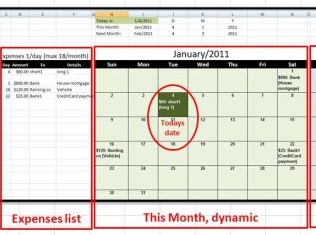
Expenses calendar, to show when in a month you need to pay what bill An easy formula-only smart sheet to allow you get hold on your bills Refreshes every time you open, to show current month and shows bills   Download FaCal Excel Online

Basic Math, Conditional Formatting, DATE, Date and Time, MONTH, NETWORKDAYS, Non-functions, Standard functions, TODAY, WEEKDAY, YEAR

Recent Posts

  • Calculate above and below me
  • Stale values (Scratched functions)
  • Middle name + 1st name
  • LastSunday, LastSaturday
  • Paste Special Percentage

Archives

Categories

  • Array formula (1)
  • Formulas – combined functions (58)
  • Google Sheets (2)
  • Non-functions (36)
    • ActiveX controls (2)
    • Conditional Formatting (7)
    • Data Validation (7)
    • Excel User tips (19)
    • Format Cells (6)
    • Graphics (4)
    • Names (3)
  • Standard functions (83)
    • Basic Math (18)
    • Date and Time (16)
      • DATE (9)
      • Hour (1)
      • MONTH (7)
      • NETWORKDAYS (2)
      • TODAY (7)
      • WEEKDAY (8)
      • WEEKNUM (1)
      • YEAR (8)
    • Engineering (1)
      • CONVERT (1)
    • Information (6)
      • CELL (4)
      • ISERROR (1)
      • N (1)
    • Logical (31)
      • AND (5)
      • IF (25)
      • IFERROR (7)
      • IFNA (1)
      • IFS (1)
      • ISERROR (1)
      • OR (2)
    • Lookup and References (36)
      • ADDRESS (4)
      • CHOOSE (3)
      • COLUMN (7)
      • FORMULATEXT (1)
      • HLOOKUP (1)
      • HYPERLINK (2)
      • INDEX (5)
      • INDIRECT (6)
      • MATCH (12)
      • OFFSET (15)
      • ROW (11)
      • VLOOKUP (5)
    • Math and Trig (24)
      • ABS (1)
      • CEILING (1)
      • COUNT (1)
      • COUNTA (4)
      • INT (9)
      • LARGE (2)
      • MAX (1)
      • Min (2)
      • SMALL (3)
      • SUM (3)
      • SUMIF (1)
      • SUMIFS (2)
      • SUMPRODUCT (1)
    • Statistical (6)
      • Average (1)
      • COUNTIF (4)
      • COUNTIFS (1)
    • Texts and Strings (24)
      • CHAR (5)
      • CONCATINATE (1)
      • FIND (1)
      • LEFT (8)
      • Len (4)
      • MID (9)
      • REPT (3)
      • RIGHT (2)
      • SEARCH (9)
      • STRING (1)
      • SUBSTITUTE (2)
      • TEXT (4)
      • TRIM (2)
      • VALUE (2)
  • Uncategorized (2)
  • User-Defined f(x)s = UDF (3)
    • HyperlinkOf (1)
  • Worksheet (16)
  • XLfxs (2)

Meta

  • Log in
  • Entries feed
  • Comments feed
  • WordPress.org
  • New function IFERROR, finally IFERROR
  • Multiple lines in cell using functions CHAR
  • Min Max vehicle Formulas - combined functions
  • Sheet() and Sheets() Lookup and References
  • VALUE() of LEFT() Formulas - combined functions
  • LastSunday, LastSaturday Date and Time
  • Fx to cut long column into two columns Formulas - combined functions
  • Rotate table using 1 formula ADDRESS

Copyright © 2026 Excel Functions.

Powered by PressBook News Dark theme