

Skip to content

Excel Functions

Excel f(x)s = Excel Functions

  • Limited Ceiling Basic Math
  • Worksheet name, dynamically using formula CELL
  • VALUE() of LEFT() Formulas - combined functions
  • CHOOSE – tree of decisions CHOOSE
  • Multiple-Validations (connected to each other) Data Validation
  • Lesson learned: Do not trust Google Sheets function Google Sheets
  • Recover the unrecoverable Excel User tips
  • Middle name + 1st name Basic Math

Tag: shapes

Shapes with dynamic output

Posted on July 18, 2022 By ANmar
Shapes with dynamic output

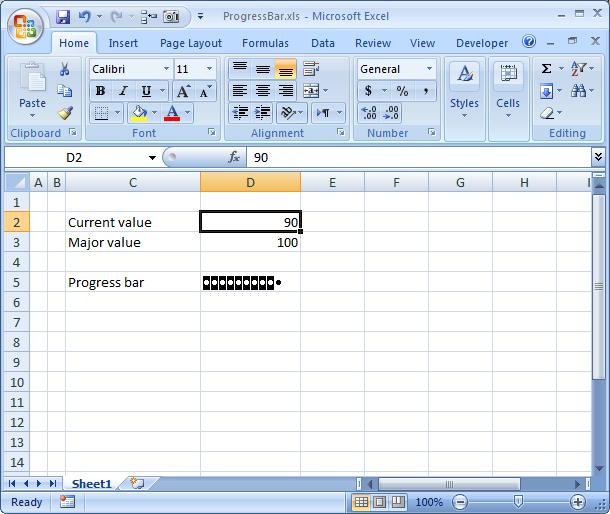
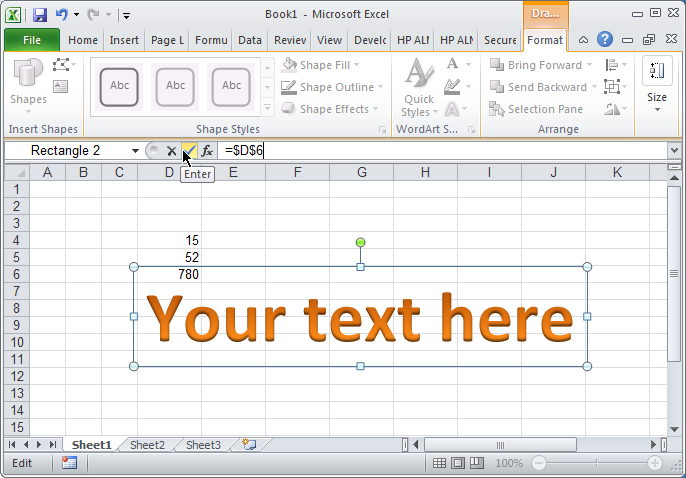
A trick learned awhile ago. Creating shapes connected to cell, that updated automatically.

When following steps attached, you will be able to connect any shape to any cell in away making it “linked”, so when cell changes the shape will also get updated.

Used it to enlarge or track user attention to a certain value, or sometimes to format certain text in a free way outside cells limitations.

Read More “Shapes with dynamic output” »

Excel User tips, Graphics, Non-functions

Recent Posts

  • Stale values (Scratched functions)
  • Middle name + 1st name
  • LastSunday, LastSaturday
  • Paste Special Percentage
  • Jan8 date format

Archives

Categories

  • Array formula (1)
  • Formulas – combined functions (58)
  • Google Sheets (2)
  • Non-functions (36)
    • ActiveX controls (2)
    • Conditional Formatting (7)
    • Data Validation (7)
    • Excel User tips (19)
    • Format Cells (6)
    • Graphics (4)
    • Names (3)
  • Standard functions (82)
    • Basic Math (18)
    • Date and Time (16)
      • DATE (9)
      • Hour (1)
      • MONTH (7)
      • NETWORKDAYS (2)
      • TODAY (7)
      • WEEKDAY (8)
      • WEEKNUM (1)
      • YEAR (8)
    • Engineering (1)
      • CONVERT (1)
    • Information (6)
      • CELL (4)
      • ISERROR (1)
      • N (1)
    • Logical (30)
      • AND (5)
      • IF (24)
      • IFERROR (6)
      • IFNA (1)
      • IFS (1)
      • ISERROR (1)
      • OR (2)
    • Lookup and References (36)
      • ADDRESS (4)
      • CHOOSE (3)
      • COLUMN (7)
      • FORMULATEXT (1)
      • HLOOKUP (1)
      • HYPERLINK (2)
      • INDEX (5)
      • INDIRECT (6)
      • MATCH (12)
      • OFFSET (15)
      • ROW (11)
      • VLOOKUP (5)
    • Math and Trig (24)
      • ABS (1)
      • CEILING (1)
      • COUNT (1)
      • COUNTA (4)
      • INT (9)
      • LARGE (2)
      • MAX (1)
      • Min (2)
      • SMALL (3)
      • SUM (3)
      • SUMIF (1)
      • SUMIFS (2)
      • SUMPRODUCT (1)
    • Statistical (5)
      • COUNTIF (4)
      • COUNTIFS (1)
    • Texts and Strings (24)
      • CHAR (5)
      • CONCATINATE (1)
      • FIND (1)
      • LEFT (8)
      • Len (4)
      • MID (9)
      • REPT (3)
      • RIGHT (2)
      • SEARCH (9)
      • STRING (1)
      • SUBSTITUTE (2)
      • TEXT (4)
      • TRIM (2)
      • VALUE (2)
  • Uncategorized (2)
  • User-Defined f(x)s = UDF (3)
    • HyperlinkOf (1)
  • Worksheet (16)
  • XLfxs (2)

Meta

  • Log in
  • Entries feed
  • Comments feed
  • WordPress.org
  • VLookup Lookup and References
  • Schedule column Basic Math
  • Links between two workbooks – dynamically using functions INDIRECT
  • Sheet() and Sheets() Lookup and References
  • Excel Functions = XL f(x)s XLfxs
  • FORMULATEXT to show formulas FORMULATEXT
  • CHOOSE – tree of decisions CHOOSE
  • Sorting with functions only CHOOSE

Copyright © 2026 Excel Functions.

Powered by PressBook News Dark theme